Wholesale & distribution
ERP for wholesale, from quote to payment
For traders with business customers. Quote, order, delivery note, invoice and dunning come from one record. Price lists, credit limit and holds apply in every step. The AI Steward handles the routine in between.
Where time and money get stuck in wholesale
Price lists in Excel
Tiered prices, promotions and terms live in lists only two people know. Every quote starts with searching.
Delivered despite open invoices
Often only accounting knows a customer is over the limit. The warehouse delivers anyway.
Quotes are forgotten
Quotes sit in Word and the inbox. Follow-up happens when someone remembers.
Customers ask for the status
Where is the delivery, which invoice is open? Every question is a call or an email.
How an order runs in relyd
The screenshots are taken from relyd, filled with sample data of a beverage wholesaler in central Switzerland.
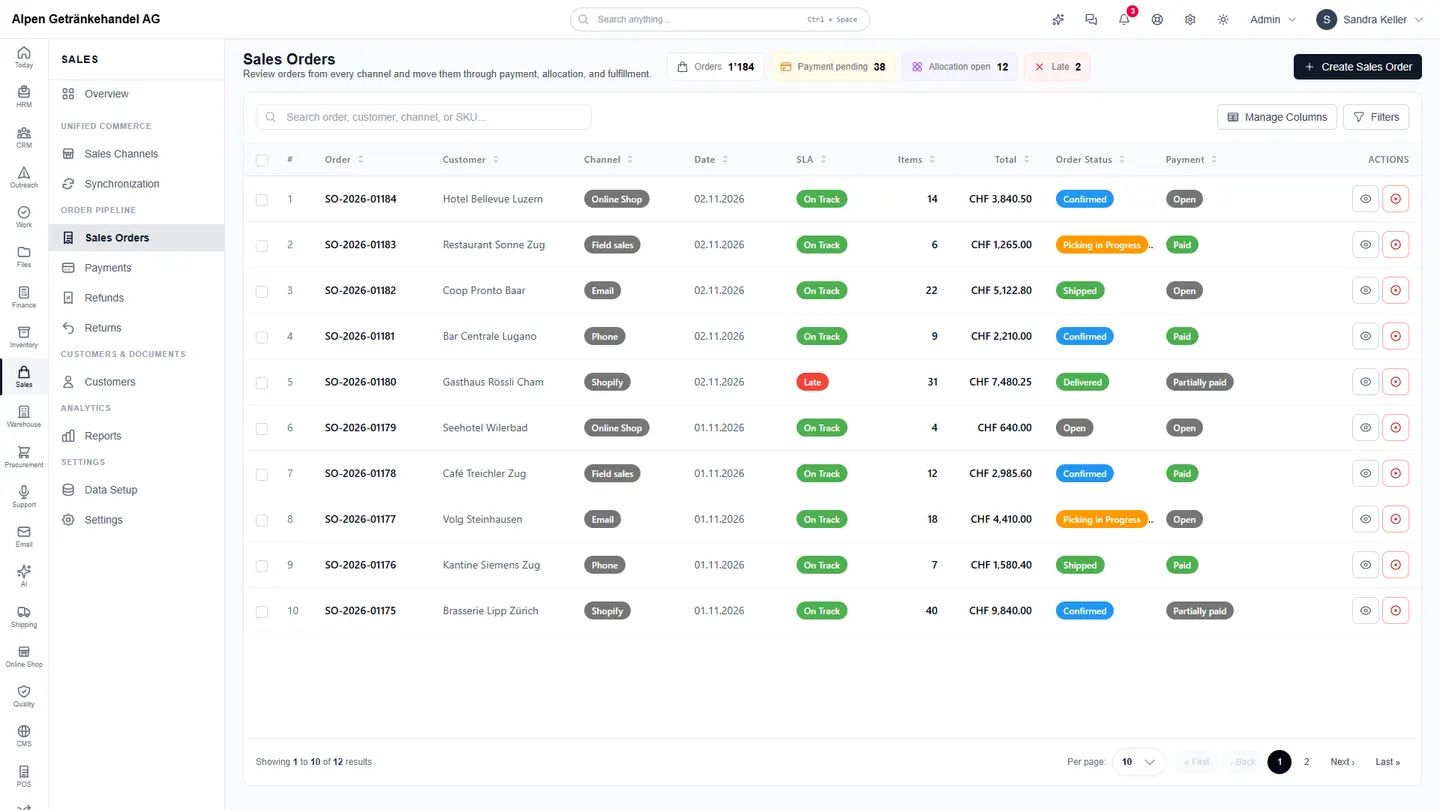
Orders from every channel in one place
Orders from the online shop, Shopify, field sales or email land in the same list. Every order carries the prices of the matching price list and the customer's payment terms.
- Price lists with tiered prices per sales channel
- Credit limit, open items and holds before every delivery
- Delivery deadline per order, delays visible at once
- Partial deliveries and backorders without rework
Invoice from the order, payment from the bank
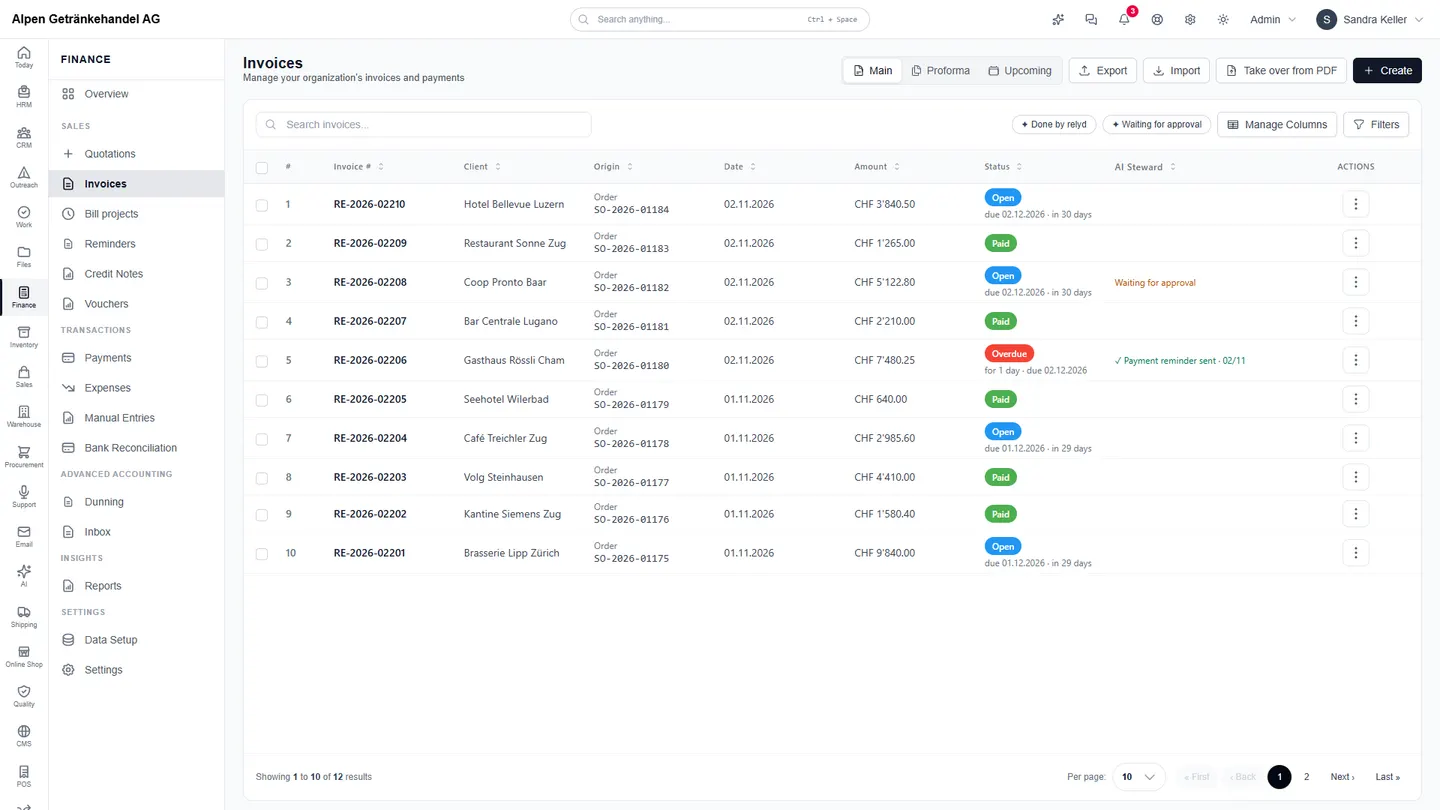
After delivery the invoice is created from the order. Every invoice shows which order it comes from. Payments from the bank file are matched to the invoices.
- Invoice with QR payment part and your payment terms
- Payment matching from camt files
- Reminders and dunning in stages
- The AI Steward column shows what is already done
The day starts with what matters
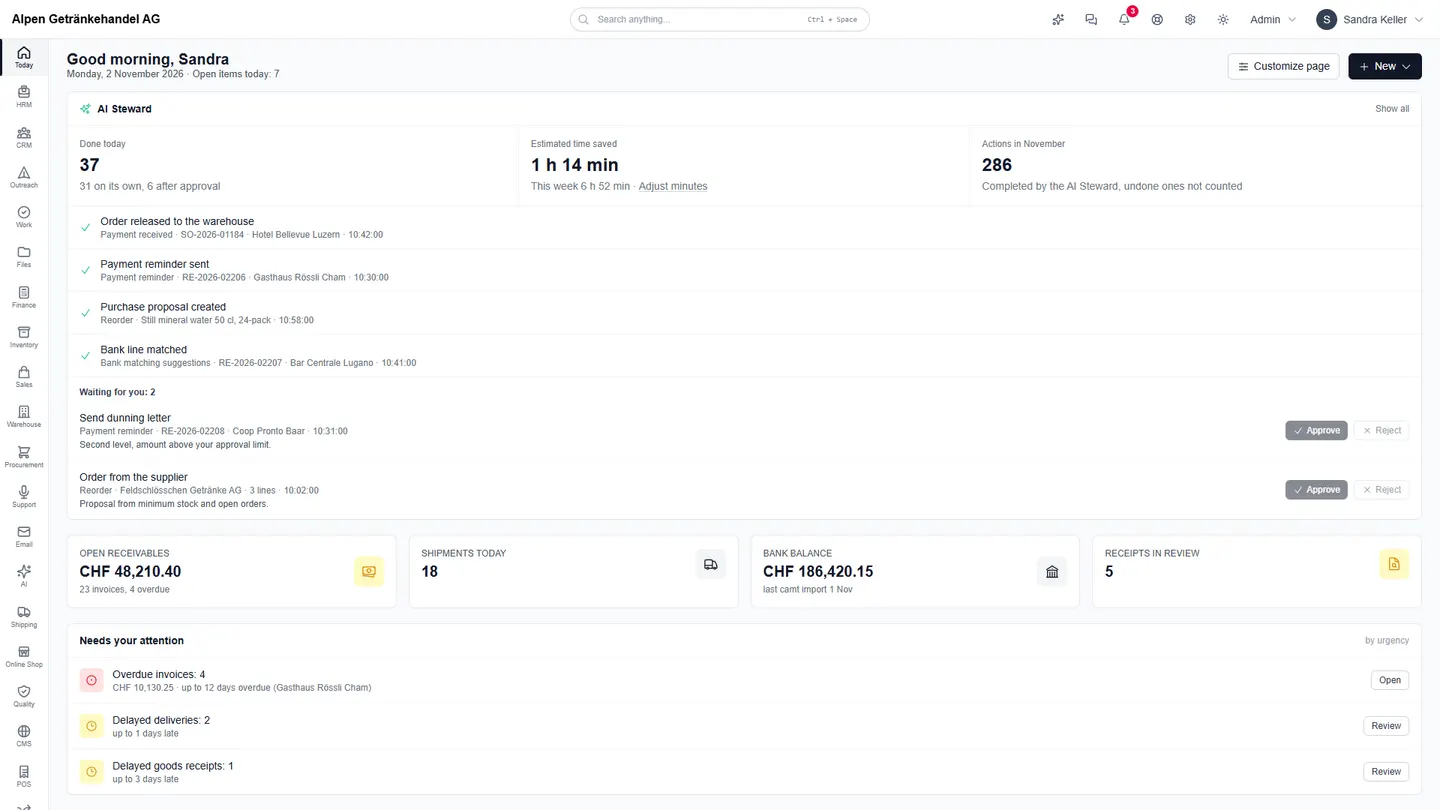
The start page “Today” shows what the AI Steward handled overnight, what waits for your approval and which items need attention.
- Completed tasks with the reason
- Approve or reject with one click
- Overdue invoices and late deliveries first
- Receivables, bank balance and today's shipments
What the AI Steward takes over in wholesale
Every workflow starts manually or with your approval and only runs on its own once it has proven itself. Every step is logged.
Credit limit exceeded
Holds new orders of customers above their credit limit and notes whether a release looks justified.
Payment received
Releases fully paid orders to the warehouse; the release checks prepayment, credit limit and holds again.
Payment reminder
Writes a friendly reminder for overdue invoices or proposes the next dunning notice. Dunning notices always wait for your approval.
Reorder
Proposes a draft purchase suggestion for active products at or below their reorder level.
Purchase order not confirmed
Asks the supplier to confirm approved purchase orders and the delivery date after three days without delivery.
Check delivery note
Compares submitted delivery notes with the order and with what was picked, before the goods leave.
Modules for wholesale
Frequently asked questions
- Does relyd work with price lists and tiered prices?
- Yes. Price lists with quantity-based tiers and validity dates apply per sales channel and flow into order and invoice.
- What happens when a customer is over the credit limit?
- The order is held and reported as a task. Someone with the right to do so releases it.
- Can customers order themselves?
- Yes, through the online shop in relyd or through Shopify and WooCommerce. Every order goes straight into relyd as an order.
- Do business customers get their own portal?
- Yes. With their own login customers see their quotes, invoices, payments, documents and support tickets.
- With several warehouses?
- Yes. Stock, transfers and availability apply across all warehouses. Allocation rules decide which warehouse ships.
- Is existing data taken over?
- Yes. Customers, items, prices and open invoices from Excel or your current system are part of the setup.
- Where is the data stored?
- The data is stored in European data centres.
Test relyd with your own items
14 days free, no credit card. In a demo we show relyd on your own process.